Ayushman Bharat – PM-JAY Scheme (AB-PMJAY)
the Ayushman Bharat – Pradhan Mantri Jan Arogya Yojana (AB-PMJAY), India’s flagship national public health insurance scheme.
This scheme is a massive entitlement-based health assurance program providing free, cashless, and paperless access to healthcare services.
The scheme is managed by the National Health Authority (NHA), and its primary focus is healthcare, not the PMAY-U housing scheme we were previously discussing.
Ayushman Bharat – PM-JAY Scheme (AB-PMJAY)
This scheme is a massive entitlement-based health assurance program providing free, cashless, and paperless access to healthcare services.
| Feature | Details |
| Core Benefit | Provides a health cover of ₹5,00,000 per family per year for secondary and tertiary hospitalization. |
| Coverage | Includes medical examinations, treatment, diagnostics, pre- and post-hospitalization expenses (up to 15 days), medicines, and medical implants. |
| Eligibility | Entitlement-based (no enrollment process). Families are identified based on deprivation and occupational criteria from the Socio-Economic Caste Census (SECC) database. |
| Inclusivity | No cap on family size or age. Pre-existing diseases are covered from the very first day of enrollment. |
| Portability | Benefits are portable across India, meaning a beneficiary can receive cashless treatment at any empanelled public or private hospital nationwide. |
| Recent Update | The scheme recently expanded to provide health coverage up to ₹5 lakh to all senior citizens aged 70 years and above, irrespective of their income level. |
💻 Functions of the Beneficiary Portal
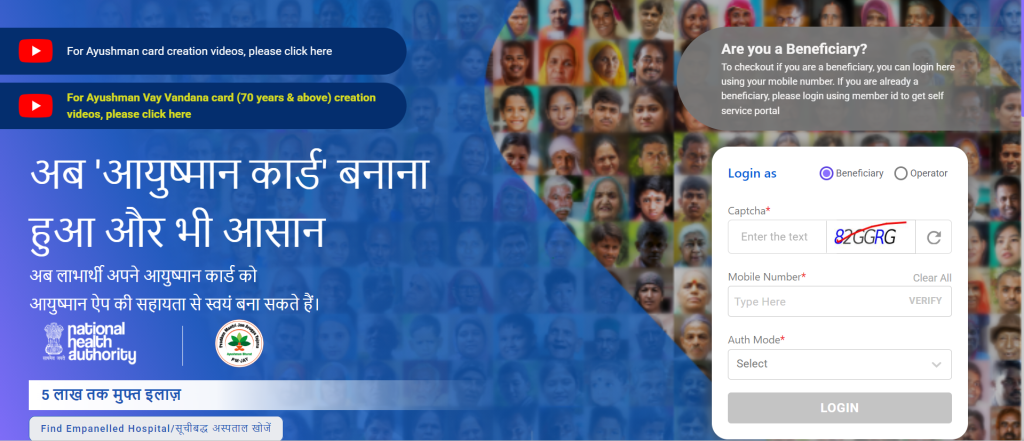
beneficiary.nha.gov.in, allows eligible individuals to manage their health benefits directly:
- Check Eligibility: Users can log in using their registered mobile number to verify if their family is already listed as a beneficiary under AB-PMJAY.
- Ayushman Card Creation: Beneficiaries can complete the e-KYC process using their Aadhaar details and download their Ayushman Card directly.
- Add/Update Details: Features are available for linking Aadhaar to existing cards, adding new eligible family members, and performing a Redo e-KYC to update photos or contact details.
- Find Hospitals: Users can search for empaneled public and private hospitals where they can avail of the cashless treatment.
- Ayushman Vaya Vandana Card: The portal provides specific options and videos for the creation of the health card for senior citizens (70+).
The Ayushman Bharat Pradhan Mantri Jan Arogya Yojana (AB-PMJAY) is an entitlement-based scheme, meaning there’s no general application process for all citizens. Eligibility is determined primarily from the Socio-Economic Caste Census (SECC) 2011 data.
However, once your eligibility is established, you must follow a step-by-step process to get your Ayushman Card (e-card). Additionally, the government has enabled a self-registration/e-KYC process for eligible beneficiaries to generate their cards themselves.
Step-by-Step Process to Apply/Generate Ayushman Card
1. Check Your Eligibility
Before starting the card generation process, you must confirm if your family is covered under the scheme.
- Online Check (Recommended):
- Visit the official Beneficiary Identification System (BIS) website: https://beneficiary.nha.gov.in/
- Enter your Mobile Number and click ‘Verify’.
- Enter the OTP received.
- Select your State, Scheme (PMJAY), District, and a Search By option (e.g., Aadhaar Number, Name, Ration Card number).
- The system will search the database and display a list of eligible family members.
- Offline Check: Call the Toll-Free Helpline 14555 or visit the nearest Common Service Centre (CSC) or Empanelled Hospital to check your name in the list.
2. Self-Registration and e-KYC for Card Generation
If your name is found in the eligibility list, you can proceed to generate your card, often called the e-KYC (Know Your Customer) process.
| Step | Action | Note |
| Step 2.1: Login | Go back to the official portal (beneficiary.nha.gov.in), log in with your mobile number and OTP, and locate your name in the search results list. | |
| Step 2.2: Initiate e-KYC | Find the member’s name for whom the card is to be made and click on the ‘e-KYC’ icon. | The status will likely show “Identified” or “Card Not Made.” |
| Step 2.3: Aadhaar Verification | Select the preferred method for Aadhaar authentication (e.g., Aadhaar OTP, Fingerprint, Iris). For most users, Aadhaar OTP is the easiest. | The OTP will be sent to the mobile number linked with your Aadhaar. |
| Step 2.4: Data Matching | Once the Aadhaar OTP is verified, the system will compare the details from the PM-JAY database with your Aadhaar data. You must ensure a high Matching Score. | The e-KYC will capture your latest photo from the Aadhaar database. |
| Step 2.5: Final Submission | Complete any remaining fields (e.g., relationship to the head of the family, pin code) and click ‘Submit’. | A confirmation message for “e-KYC Completed” will appear. |
3. Final Card Download
- Wait for Approval: The e-KYC data is sent to the State Health Agency (SHA) for final verification and approval. This may take a few hours to several days.
- Download Card: Once approved, you can log in to the same portal (beneficiary.nha.gov.in) again, and the status will change to “Card Approved.” You can then click the ‘Download Card’ option to get a digital copy of your Ayushman Card.
- Physical Card: You can get a physical PVC card printout from any nearby CSC centre or the hospital’s Arogya Mitra counter.